Memory
Memory ManagementKeep a Layer That Doesn't Lose Details
Some facts should survive summarization and future sessions.
s01 → ... → s07 → s08 → s09 → s10 → s11 → ... → s16 → s17
"Keep information that later tasks will need." File storage + an index + relevance selection + on-demand recall.
Harness layer: Memory stores reusable knowledge outside the conversation and recalls it for related tasks.
The Problem
An Agent starts a new session without the previous conversation in messages. A coding preference, project fact, or debugging clue from an earlier session may still matter. Without persistent storage, the user has to provide it again.
A complete transcript works as an archive, but sending it with every request does not scale. The conversation keeps growing, useful information becomes hard to locate, and old facts may no longer be true. Memory must decide what is worth keeping across sessions and which records belong in the current task.
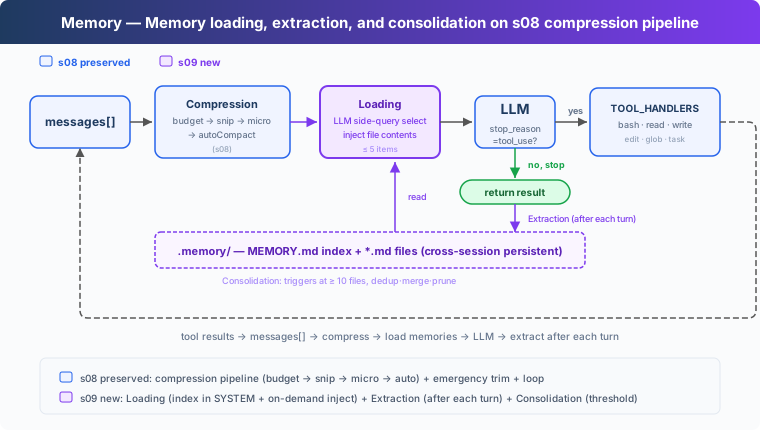
Why Not Put Everything in the System Prompt?
The direct approach is to write preferences and project facts into one file, then put the entire file in the system prompt. It remembers the information, but every LLM call must resend all of it. As the store grows, more unrelated material consumes input tokens and context space.
s07 showed a better reading pattern: keep a short index available and load full content only when needed. Skills are human-authored and read-only. Memory lets the Agent extract information from conversation and reuse it in later work.
This chapter therefore needs four parts: storage, recall, extraction, and consolidation.
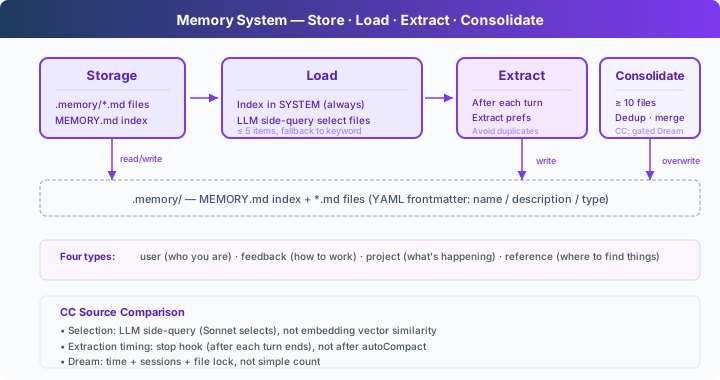
Storage: One File per Record
Each memory is a Markdown file under .memory/. YAML frontmatter stores its name, description, and type:
---
name: user-preference-tabs
description: User prefers tabs for indentation
type: user
---

User prefers using tabs, not spaces, for indentation.
There are four memory types:
| Type | What it stores | Example |
|---|---|---|
| user | A durable user preference | "Use tabs for indentation" |
| feedback | Guidance that remains useful | "Do not mock the database" |
| project | A stable project fact | "The authentication rewrite is compliance-driven" |
| reference | An external pointer or lookup clue | "The pipeline issue is tracked in Linear INGEST" |
MEMORY.md is the index, with one line per memory file. After a write, rebuild_memory_index() regenerates it from the files:
def write_memory_file(name, mem_type, description, body):
    path = MEMORY_DIR / f"{memory_slug(name)}.md"
    path.write_text(
        memory_document(name, mem_type, description, body), encoding="utf-8"
    )
    rebuild_memory_index()
    return path
The index supports selection while full content stays in the individual files.
Recall: Select First, Then Load Full Records
At the start of a user request, select_relevant_memories() sends the recent user text and memory catalog to a lightweight model call. It selects at most five relevant records:
prompt = (
    "Select memory records that are relevant to the current user request. "
    "Return only a JSON array of catalog indices, such as [0, 2]. "
    "Return [] when none are relevant."
)
If the model call or JSON parsing fails, the code falls back to keyword matching. Only after selection does load_memories() read the corresponding files, with a limit on the total recalled text.
relevant_memories = load_memories(messages)
system = build_system(relevant_memories)
build_system() states that recalled content is background knowledge, not a new user command. The current request wins when it conflicts with memory. This lets the Agent use old information without letting old records issue instructions on the user's behalf.
Extraction: Save Reusable Information After the Turn
Users do not always say "remember this." After the Agent finishes the current response, extract_memories() inspects the conversation and keeps only information likely to help later:
tool_calls = [
    block for block in response.content if block.type == "tool_use"
]
if not tool_calls:
    force = trigger_hooks("Stop", messages)
    if force:
        messages.append({"role": "user", "content": force})
        continue
    if extract_memories(messages):
        consolidate_memories()
    return
The model returns candidates, not records that are automatically allowed onto disk. Each candidate carries a scope: only persistent means that the information should survive into later sessions. current_task covers one-off commands, temporary paths, and temporary restrictions.
should_store_memory() performs the final admission check. It rejects incomplete candidates, phrases that refer to the current session or task, and duplicates of existing records. For example, "do not create files in this session" constrains the current work; it must not remain active in the next session.
Consolidation: Merge Duplicate and Stale Records
As memory files accumulate, some become duplicate, contradictory, or stale. The teaching implementation calls consolidate_memories() after the store reaches ten records and asks the model for a cleaned list.
The code parses and validates the new list before replacing old files. It snapshots the current records first; if deletion or writing fails, it restores the originals and rebuilds the index:
snapshot = {
    path.name: path.read_text(encoding="utf-8")
    for path in MEMORY_DIR.glob("*.md")
    if path.name != MEMORY_INDEX.name
}

try:
    for path in MEMORY_DIR.glob("*.md"):
        if path.name != MEMORY_INDEX.name:
            path.unlink()
    for record in consolidated:
        path = MEMORY_DIR / f"{memory_slug(record['name'])}.md"
        path.write_text(memory_document(
            record["name"], record["type"],
            record["description"], record["body"],
        ), encoding="utf-8")
    rebuild_memory_index()
except Exception:
    for path in MEMORY_DIR.glob("*.md"):
        if path.name != MEMORY_INDEX.name:
            path.unlink()
    for filename, content in snapshot.items():
        (MEMORY_DIR / filename).write_text(content, encoding="utf-8")
    rebuild_memory_index()
    raise
The course uses a simple count threshold. A real application must also choose a schedule that fits its data volume and prevent concurrent processes from rewriting the same store.
This Lesson's Code
| Part | Implementation |
|---|---|
| Agent Loop | Keeps messages, tool calls, tool results, and hook trigger points |
| Base tools | bash, read_file, write_file, edit_file, glob |
| Storage | .memory/MEMORY.md index + .memory/*.md records |
| Recall | Catalog selection + keyword fallback + a body-size limit |
| Writing | End-of-turn extraction + persistence checks + duplicate filtering |
| Consolidation | Merge at the threshold; restore old files after replacement failure |
Boundary with s08: s08 manages the active session's context budget. s09 manages reusable knowledge outside the conversation. Memory is selective storage, not a lossless transcript backup, and it does not replace context compaction.
Try It
cd learn-claude-code
python s09_memory/code.py
- Enter
I prefer using tabs for indentation. Remember that.After the turn, check that.memory/contains a new record andMEMORY.mdcontains its index entry. - Enter
q, restart the program, and askWhat indentation style do I prefer?Confirm that a new session can recall the preference. - Store another preference unrelated to code formatting, then ask about indentation. Observe that the current request loads only relevant records.
- Enter
Do not create files in this session.Confirm that this temporary requirement does not become a persistent rule for the next session.
Exact wording and extraction counts can vary by model. Check what was written to .memory/ and whether a later session recalls only relevant information.
What's Next
Memory preserves information across sessions, but a complex task also needs durable status and dependency tracking. A TODO kept only in the conversation cannot carry progress across process restarts.
s10 Task System → Persist tasks, statuses, and dependencies to disk.