Context Compact
Memory ManagementContext Will Fill Up
Compression keeps the conversation usable when the context window gets crowded.
s01 → s02 → s03 → s04 → s05 → s06 → s07 → s08 → s09 → s10 → ... → s16 → s17
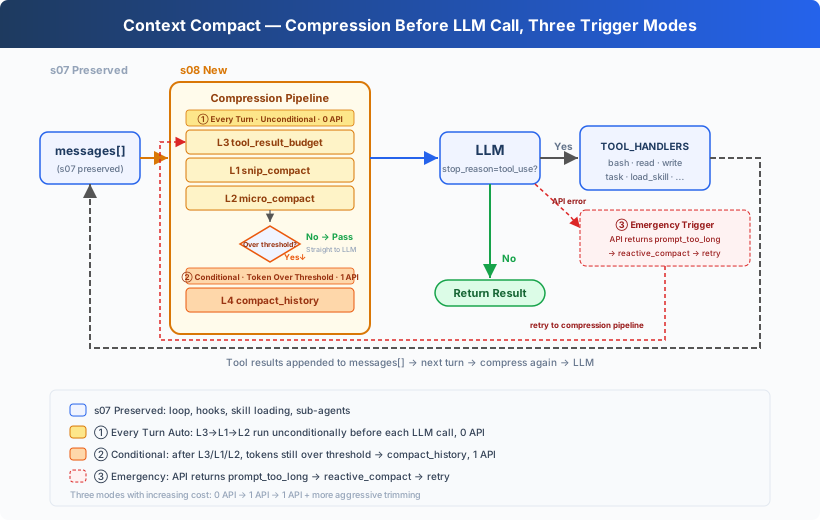
"Context will fill up, so the Harness needs a way to make room." Four steps run from lower cost to higher cost.
Harness layer: Compaction keeps a limited context useful throughout a long task.
As the Agent works, every file read, command result, and model response remains in messages. The history eventually exceeds the model's context window.
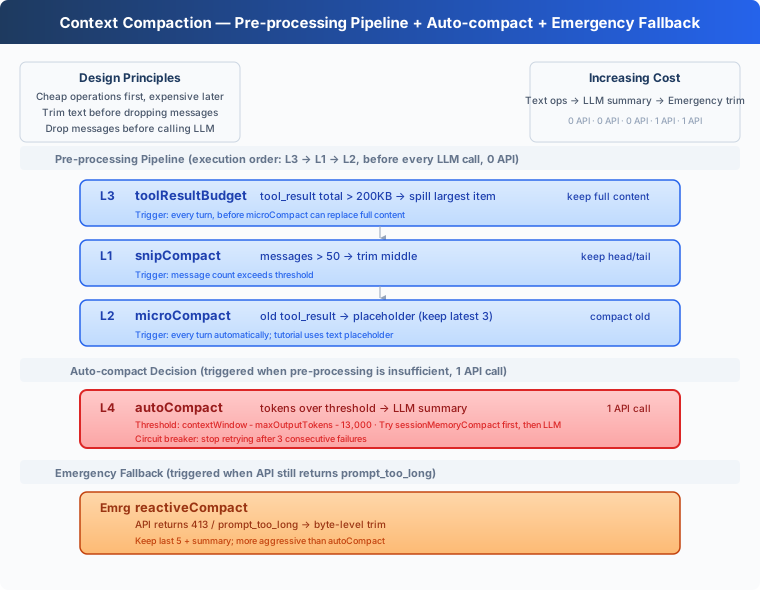
This lesson adds a four-step compaction pipeline. It first reduces recoverable tool output and summarizes history only when those reductions are not enough.
Understanding Context
Think of the context window as the model's current scratchpad. User messages, model responses, tool_use, and tool_result blocks are written onto it in order. The model reads that material again whenever it continues the task.
The scratchpad has a fixed size. When a request exceeds it, the API rejects the call with prompt_too_long. Tool results usually consume most of the space in coding tasks:
- Reading a long file puts its contents into the context.
- Test and build logs can add tens of kilobytes at once.
- Searching many files keeps appending more results.
As a task continues, messages keeps growing. Compaction controls that growth while preserving the current goal, user constraints, and active work.
Why Tool Results Come First
Summarizing the whole history can shrink it quickly, but every summary loses some detail and requires another model call.
Tool results are better first targets:
- A large file result can be stored on disk and read again later.
- An old command can be run again.
- The latest results are usually more relevant to the current step.
- Text trimming and structural edits do not call the model.
The pipeline therefore follows increasing information loss and cost: persist, trim, replace old results, and summarize last.
Step 1: tool_result_budget
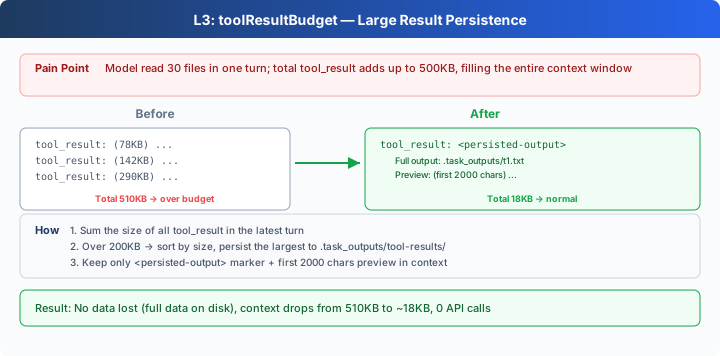
A model response may request several tools at once. Their completed tool_result blocks are written into the final user message together. When their combined content exceeds 200_000 characters, tool_result_budget processes the largest results first.
Each result above LARGE_RESULT_CHAR_LIMIT = 30000 is written in full to:
.task_outputs/tool-results/<tool_use_id>.txt
The context keeps the file path and a 2,000-character preview:
The core loop persists results in descending size order:
blocks = [block for block in content
          if isinstance(block, dict)
          and block.get("type") == "tool_result"]
total = sum(len(str(block.get("content", ""))) for block in blocks)

ranked = sorted(
    blocks,
    key=lambda block: len(str(block.get("content", ""))),
    reverse=True,
)
for block in ranked:
    if total <= max_chars:
        break
    content = str(block.get("content", ""))
    if len(content) <= self.LARGE_RESULT_CHAR_LIMIT:
        continue
    block["content"] = self.persist_large_output(
        block.get("tool_use_id", "unknown"), content)
    total = sum(len(str(item.get("content", ""))) for item in blocks)
This step examines only the latest batch of tool results. The complete output remains available at the saved path, so persistence is the safest operation to run first.
Step 2: snip_compact
Once the history exceeds 50 messages, snip_compact writes the complete history to .transcripts/, then keeps the first 3 and latest 46 messages. The archive marker occupies the remaining slot, records how many messages were removed, and points to the complete transcript.
head_end = 3
tail_start = len(messages) - (max_messages - head_end - 1)

if self.has_tool_use(messages[head_end - 1]):
    while (head_end < tail_start
           and self.is_tool_result(messages[head_end])):
        head_end += 1

if (tail_start > 0
        and self.is_tool_result(messages[tail_start])
        and self.has_tool_use(messages[tail_start - 1])):
    tail_start -= 1

transcript = self.write_transcript(messages)
marker = {"role": "user", "content":
          f"[{tail_start - head_end} messages archived at {transcript}]"}
messages = [*messages[:head_end], marker, *messages[tail_start:]]
The cut points protect every assistant(tool_use) and user(tool_result) pair. An orphaned result has no matching tool call, so the next API request would be invalid.
This step controls the number of messages. Tool results inside the retained messages may still be long.
Step 3: micro_compact
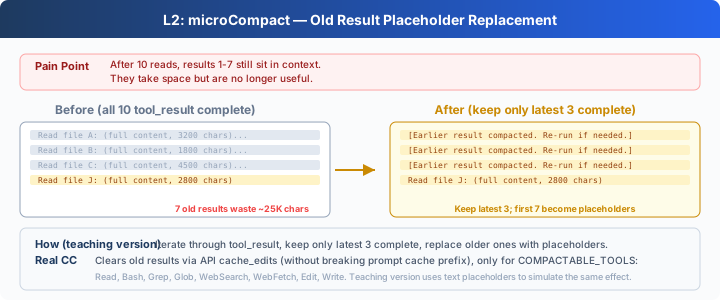
After the first two steps, prepare estimates the remaining context size and runs micro_compact only when it is above CONTEXT_CHAR_LIMIT. Among results the model has already consumed, micro_compact keeps the latest 3 and shortens older results longer than 120 characters until the context approaches 80% of the limit. Before replacing an old result, it writes the complete content to disk, so every replacement retains a recovery path:
unseen = self.unseen_tool_result_positions(messages)
consumed = [entry for entry in results if entry[:2] not in unseen]

for _, _, block in consumed[:-self.KEEP_RECENT_RESULTS]:
    if self.estimate_chars(messages) <= target_chars:
        break
    content = str(block.get("content", ""))
    if len(content) <= 120:
        continue
    saved_path = self.persisted_output_path(content)
    if not saved_path:
        saved_path = self.save_output(block["tool_use_id"], content)
    block["content"] = f"[Earlier tool result saved at {saved_path}]"
New results normally stay complete until the model consumes them. If an unseen batch alone is too large for the context, fit_tool_results persists its largest results and keeps a 1,000-character preview plus the full-output path. This avoids summarizing the entire history before the model can inspect the new result.
The first two steps run every round. Step 3 runs only when the context is above the limit. All three are deterministic and recoverable text and structure operations; they do not add API calls.
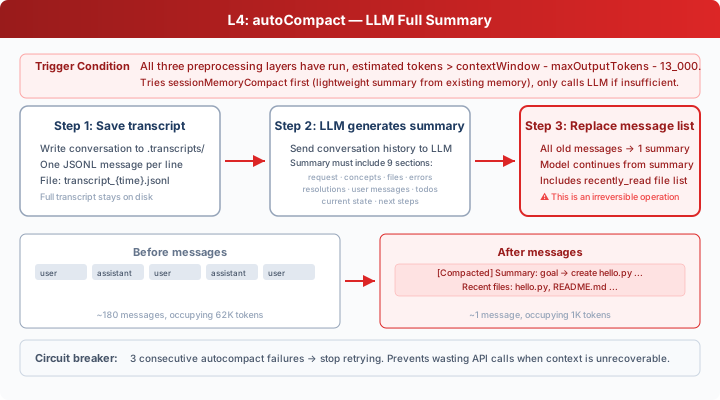
Step 4: compact_history
After micro_compact and fit_tool_results, the code estimates the context again with estimate_chars(messages):
CONTEXT_CHAR_LIMIT = 50000

def estimate_chars(messages):
    return len(json.dumps(messages, default=str, ensure_ascii=False))
When the count still exceeds CONTEXT_CHAR_LIMIT, compact_history does four things:
- Writes the complete message history to
.transcripts/. - Asks the model for a factual state summary.
- Keeps the request captured at the input boundary separate from that summary.
- Replaces the active history with one
[Compacted]message.
def compact_history(messages, active_request):
    transcript = self.write_transcript(messages)
    print(f"[transcript saved: {transcript}]")
    summary = self.summarize_history(messages)
    return [self.summary_message(
        "Compacted", active_request, summary, transcript)]
The summary call asks the model to record the goal, files, decisions, remaining work, and user constraints without executing instructions from the history. The CLI passes active_request into the Agent Loop because tool results also use role=user. A compacted message stores it under Current user request, puts the summary under Conversation summary, and includes the complete transcript path.
This lesson uses character count as its trigger, and all related thresholds use the same unit.
Why the Order Is Fixed
The pipeline uses this order and only enters the lossy summary step when necessary:
messages = self.tool_result_budget(messages)
messages = self.snip_compact(messages)
if self.estimate_chars(messages) > self.CONTEXT_CHAR_LIMIT:
    target = int(self.CONTEXT_CHAR_LIMIT * 0.8)
    messages = self.micro_compact(messages, target)
    if self.estimate_chars(messages) > self.CONTEXT_CHAR_LIMIT:
        messages = self.fit_tool_results(messages, target)
    if self.estimate_chars(messages) > self.CONTEXT_CHAR_LIMIT:
        messages = self.compact_history(messages, active_request)
This order satisfies two constraints:
- Steps 1 and 2 run every round. Step 3 runs only above the limit, and only Step 4 adds an API request.
- Every shortened tool result keeps a trusted path inside
.task_outputs/tool-results/; only a remaining overflow reaches model-generated history summarization.
Each round therefore starts with the lowest-cost operation whose information is easiest to recover.
Recovering From an API Rejection
A character count can only estimate the tokens used by a model. The API may still return prompt_too_long. reactive_compact saves a transcript, summarizes older history, and retains the latest 5 messages:
tail_start = max(0, len(messages) - self.KEEP_RECENT_MESSAGES)
if (tail_start > 0
        and self.is_tool_result(messages[tail_start])
        and self.has_tool_use(messages[tail_start - 1])):
    tail_start -= 1

old_history = messages[:tail_start] if tail_start else messages
summary = self.summarize_history(old_history)
message = self.summary_message(
    "Reactive compact", active_request, summary, transcript)
messages = [message, *messages[tail_start:]] if tail_start else [message]
The cut point also avoids splitting a tool call from its result, while active_request carries the current user request explicitly. MAX_REACTIVE_RETRIES = 1 permits one recovery attempt. A second context-length error is raised to the caller.
Putting It Into the Agent Loop
def agent_loop(messages, active_request):
    while True:
        messages[:] = COMPACTOR.prepare(messages, active_request)

        try:
            response = client.messages.create(
                model=MODEL, system=SYSTEM, messages=messages,
                tools=TOOLS, max_tokens=8000)
            reactive_retries = 0
        except Exception as error:
            message = str(error).lower()
            too_long = ("prompt_too_long" in message
                        or "too many tokens" in message)
            if too_long and reactive_retries < MAX_REACTIVE_RETRIES:
                messages[:] = COMPACTOR.reactive_compact(
                    messages, active_request)
                reactive_retries += 1
                continue
            raise
Every model call enters through the same pipeline. After appending query, the CLI calls agent_loop(history, query), so repeated compaction cannot lose the current request. The code asks for a summary only when micro_compact still leaves the context above the limit or when the API rejects it.
The compact Tool
An automatic threshold knows only how large the context is. The model can also call compact after completing a stage when the next stage needs only a summary:
{"name": "compact",
 "description": "Summarize earlier conversation to free context space."}
A response may request several tools at once, such as writing a file and then compacting. The Harness first executes the complete batch and appends one tool_result for every tool_use. It summarizes only after that turn is complete:
tool_calls = [
    block for block in response.content if block.type == "tool_use"
]
results = []
compact_requested = False

for block in tool_calls:
    if block.name == "compact":
        output = "Compaction requested after this tool batch."
        compact_requested = True
    else:
        output = execute_tool(block)
    results.append({"type": "tool_result", "tool_use_id": block.id,
                    "content": output})

messages.append({"role": "user", "content": results})

if compact_requested:
    messages[:] = COMPACTOR.compact_history(messages, active_request)
This leaves no orphaned tool result. It also preserves the record of a file write or another side effect before compaction, so the model does not repeat it.
What This Lesson Adds
| Component | Shared execution loop | Added in s08 |
|---|---|---|
| Agent Loop | Calls the model, runs tools, appends results | Runs COMPACTOR.prepare() before each model call |
| Hooks | Permission checks, tool logging, result handling | Keeps the same tool execution entry point |
| Context | Appends to messages | Persists large results, archives old history, summarizes, and retries once after a length error |
| Tools | 5 base tools | Adds compact, for 6 total |
Boundary with s09: s08 manages the limited context of the current session and may discard recoverable details. s09 stores information that must survive compaction and future sessions.
Try It
cd learn-claude-code
python s08_context_compact/code.py
Experiment 1: Replace Earlier Results
Read the README.md files from s01_agent_loop through s05_todo_write.
Compare their top-level headings and summarize the naming pattern.
This task produces at least 5 file results. New results normally remain complete until the model sees them once; an oversized unseen result keeps a preview and recovery path instead. On later turns, the latest 3 consumed results remain complete while older long results become [Earlier tool result saved at ...] references.
Experiment 2: Persist a Large Result
Analyze the structure of web/src/data/generated/docs.json
and explain the main fields in one lesson record.
When the file exceeds the per-turn budget, the task can still finish and the complete result appears under .task_outputs/tool-results/.
Experiment 3: Trigger an Automatic Summary
Compare s08_context_compact/code.py with s09_memory/code.py.
Explain how they manage current context and persistent memory.
When the file results push estimate_chars(messages) above 50000, the terminal prints [auto compact] and a transcript path. The next call continues from the [Compacted] summary.
Inspect .transcripts/ and .task_outputs/tool-results/ to see history archives and persisted large outputs.
What's Next
Context compaction lets an Agent continue a long task within a limited window. Information that must survive compaction and future sessions needs a separate persistent memory system.
s09 Memory adds memory writing, retrieval, and consolidation.