Skills
Planning & CoordinationLoad Only When Needed
Inject specialized knowledge only when the task actually needs it.
s01 → s02 → s03 → s04 → s05 → s06 → s07 → s08 → s09 → ... → s16 → s17
The system prompt contains the skill catalog;
load_skillreturns the fullSKILL.md.Harness Layer: Knowledge loading — show the model which skills exist, then load one by name.
The Problem
Suppose a project has a React component specification, a SQL style guide, and an API design document. We want the Agent to follow these rules during development, so the most direct approach is to put all of them into the system prompt:
SYSTEM = (
    f"You are a coding agent. "
    + open("docs/react-style.md").read()
    + open("docs/sql-style.md").read()
    + open("docs/api-design.md").read()
)
This approach lets the Agent read every specification, but it fixes all three documents in the system prompt instead of selecting only the one needed for the current task. Every LLM call sends the full text of all three documents to the model. When the task only changes React components, only the React specification is relevant; the SQL style guide and API design document still consume input tokens and context-window space that could hold code, conversation, and tool results.
The Solution
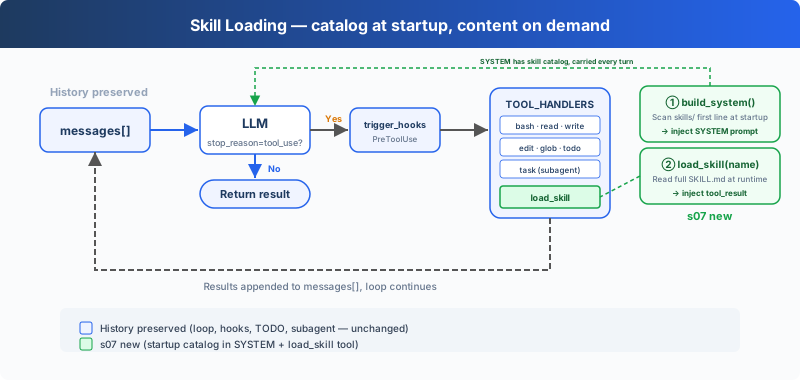
At startup, SkillLoader scans skills/*/SKILL.md, reads name and description from YAML frontmatter, and adds that catalog to the system prompt. When the model needs the full instructions, it calls load_skill(name); the returned SKILL.md is appended to the message list as a tool_result.
| Content | Model input | Added |
|---|---|---|
| Skill name and description | system prompt | At startup |
Full SKILL.md | tool_result | When load_skill is called |
How It Works
Each skill is a directory containing SKILL.md:
skills/
  agent-builder/SKILL.md
  code-review/SKILL.md
  mcp-builder/SKILL.md
  pdf/SKILL.md
Scan Skills
class SkillLoader:
    def scan(self):
        self.skills.clear()
        skills_root = self.skills_dir.resolve()
        for manifest in sorted(self.skills_dir.glob("*/SKILL.md")):
            if (not manifest.is_file()
                    or not manifest.resolve().is_relative_to(skills_root)):
                continue
            content = manifest.read_text(encoding="utf-8")
            metadata, body = self.parse_frontmatter(content)
            raw_name = metadata.get("name")
            name = raw_name.strip() if isinstance(raw_name, str) else ""
            name = name or manifest.parent.name
            raw_description = metadata.get("description")
            description = (raw_description.strip()
                           if isinstance(raw_description, str) else "")
            description = description or body.split("\n", 1)[0]
            description = " ".join(str(description).lstrip("# ").split())
            self.skills[name] = {
                "name": name,
                "description": description,
                "content": content,
            }
catalog() returns only names and descriptions:
- code-review: Perform thorough code reviews...
- pdf: Process PDF files...
Build the System Prompt
def build_system_prompt() -> str:
    return (
        f"You are a coding agent at {WORKDIR}. Use tools to solve tasks. "
        "Act, don't explain.\n\n"
        f"Skills available:\n{SKILL_LOADER.catalog()}\n\n"
        "Use load_skill to read the full instructions when a skill applies."
    )
This function combines the fixed Agent instructions with the catalog found at startup.
Load Full Content
def load(self, name: str) -> str:
    skill = self.skills.get(name)
    if skill:
        return skill["content"]
    available = ", ".join(self.skills) or "none"
    return f"Error: Unknown skill '{name}'. Available: {available}"
name looks up the startup registry; it is not interpreted as a file path. After the tool returns, the existing Agent Loop appends its content as a new tool_result message.
Try It
cd learn-claude-code
python s07_skill_loading/code.py
Try these prompts:
What skills are available?Load the code-review skill and follow its instructionsReview README.md and load the relevant skill first
Check that the system prompt contains only the catalog and that the full SKILL.md appears after load_skill is called.
What's Next
As tool calls accumulate, messages[] retains earlier file contents and tool results.
→ s08 Context Compact: shorten earlier messages and keep context available for later calls.